

The big idea Prepare your own research, opposing positions, research reflections, and introduction in the updated worksheet.
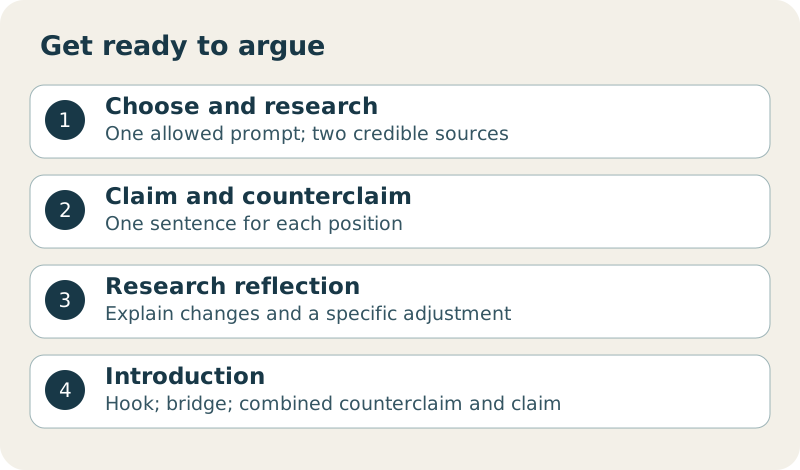
The Art of Arguing
Use the Canvas assignment to download the updated worksheet. Canvas says to follow it and the attached rubric instead of the lesson’s older assignment instructions.
The four allowed issues concern extracurricular sports and study, advertising and young people’s junk-food consumption, technology and young children’s development, or graffiti as punishable damage versus protected art. Read the exact prompts in the worksheet. You choose the issue and your position.
For each source, record author if available, article title, website or book title, URL, publication date, and access date. Include the URL even when there is no author. Explain in 2–3 sentences how each source supports your position.
Use this check on one part at a time.
Record details from the source, rather than a search-results snippet.
In your own words, explain which part of your position the evidence supports and how.
Got it now? Scroll back up and re-read the section — it should land differently.
Check currency for this topic, reliable evidence, the author’s authority, and the source’s purpose. Read evidence for both sides. Record direct quotations accurately and keep them distinct from your own notes.
Write a one-sentence claim and a one-sentence counterclaim. Both must address the selected prompt; the counterclaim takes the opposite position. Let the evidence guide the reasons you give.
Answer both added questions. Did research refine, narrow, or shift your claim or question, and why? At what specific point did you encounter a problem or adjust your approach, and what did you do differently? Keep this account true to your own work.
Write an engaging hook. Follow it with a 2–4-sentence bridge giving necessary background and a potential problem with the opposition’s position. End with one sentence combining the counterclaim and claim. Write every sentence yourself.
The updated rubric allocates 5 points to prompt, 20 to sources, 10 to claim and counterclaim, 10 to research reflections, 20 to introduction, and 5 to grammar. Check every worksheet field before saving.
Open the saved file and check that your work is present. In Canvas choose Upload, select your file, check the file name, then click Submit Assignment. Selecting a file alone does not submit it.
Answer first. Read the explanation after each choice.
Tick these off as you go. Saved in this browser.